
I started to put together quick ideas I had for my DVD cover. I needed to see them in action to see what direction I wanted to go with my design.
I took the DVD cover size details that was provided and opened a new file in Photoshop. I then marked up using the marking tool to the actual size of the cover with the details provided giving a 3mm over fill edge round the image.
I took a picture of the Stig and cut round him so he was moveable from the background, I used the quick selection tool do this. I then took another image with Jeremy, Richard and James in and also cut them out using the quick selection tool. I used the quick selection tool to do this purposely for speed, for a more professional blended look I would use the masking tool which is also extremely useful for further editing.
Next I took 3 different background images all having the same dimensions, I cut each individual presenter and pasted each presenter on a separate background. I assembled these layers underneath The Stig layer to give a similar illusion to the ‘How do you know’ DVD cover.
To finish off I took a TopGear logo and placed it at the top of the front cover keeping in tone with practically every other TopGear cover. I then quickly selected the spine and filled it with a black layer and turned the opacity down to 40% to see the same technique used in the ‘Spartacus’ cover.
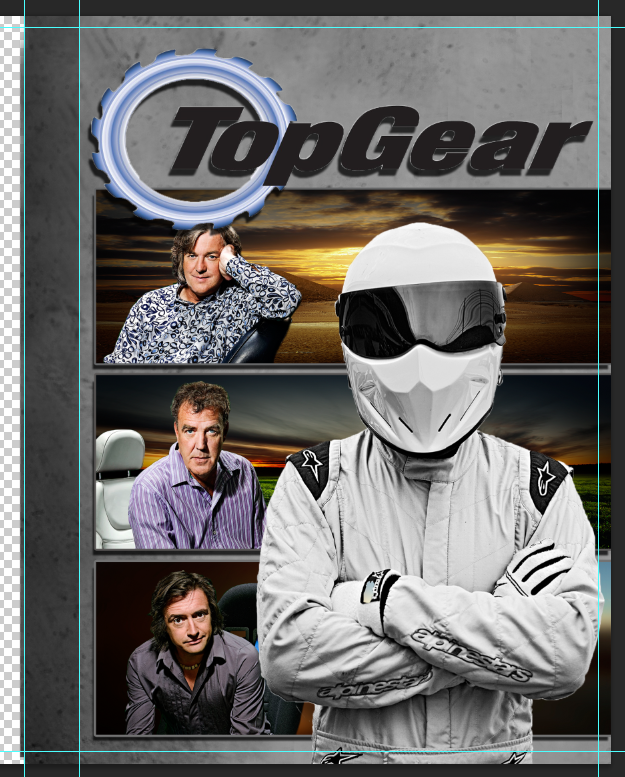
This was enough for me to see what I would work with in the final copy. Although I liked the different techniques I had tried on the original DVD covers, I believed they didn’t work well with the mood of the DVD cover. The big Stig cut out was the only part of my cover which I felt I could use again.
 Digital Imaging Software